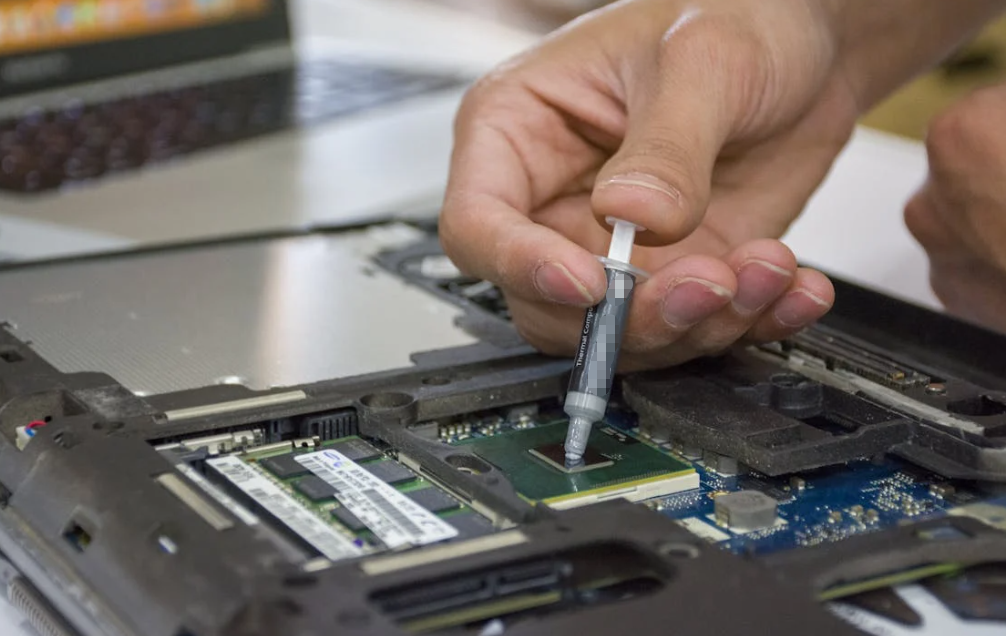
Choosing the right thermal compound for your PC might seem like an afterthought when you’re building or upgrading a system. After all, it’s just “that grey stuff between the CPU and heat sink,” right?
Not quite.
Thermal compound – sometimes called thermal paste, thermal grease, or TIM (Thermal Interface Material) – plays a vital role in your PC’s cooling performance. Its job is deceptively simple: eliminate microscopic air gaps between the processor’s heat spreader and the cooler, enabling efficient heat transfer and keeping temperatures under control. But that simplicity masks a complex interplay of material properties, performance expectations, and usage scenarios that make choosing the right compound far from trivial.
In this comprehensive guide, we’ll walk you through everything you need to make an informed decision: from core thermal characteristics and material types to practical tips for particular PC builds.
Why Thermal Compound Matters
Let’s start with the basics.
Even the most precision‑machined CPU heat spreader and cooler base aren’t perfectly smooth at the microscopic level. Without thermal compound, tiny pits and irregularities trap air – an excellent insulator – between the surfaces. That increases thermal resistance, meaning heat doesn’t flow efficiently from the CPU to the cooler. The result? Higher temperatures, thermal throttling, reduced performance, and even long‑term degradation of components.
Thermal compound fills these microscopic gaps, allowing metal‑to‑metal contact and efficient heat transfer. That’s why the quality of your compound, and understanding how to choose it, has a direct line to system stability and performance.
Core Factors to Evaluate When Choosing Thermal Compound

When evaluating a thermal compound, there are a handful of key specifications and practical traits that should guide your choice.
Thermal Conductivity (W/mK)
Thermal conductivity, measured in watts per meter‑Kelvin (W/mK), is arguably the most important spec. It tells you how well heat moves through the compound. Higher values generally mean better heat transfer.
Standard silicone‑based compounds often sit in the 1–2 W/mK range, while advanced compounds can exceed 8–12 W/mK or more. High‑end liquid metal TIMs can reach well above 30 W/mK but come with caveats.
Quick guidance:
- ~1–5 W/mK: Basic use – office computing, daily tasks
- ~5–8 W/mK: Mid‑range – mainstream gaming, light content creation
- 8+ W/mK: Enthusiast/gaming, high‑performance cooling setups
- 30+ W/mK: Liquid metal for extreme overclocking (handle with care)
That said, especially in real‑world terms, the difference between 8.5 W/mK and 12 W/mK often translates to only a few degrees Celsius, and application technique matters a great deal too.
Viscosity and Ease of Application
Viscosity describes how thick or thin a compound feels. A highly viscous compound may be excellent at filling gaps but harder to spread evenly. In contrast, too low a viscosity paste may migrate or “pump out” over time during thermal cycling.
For most users, a balanced consistency that spreads easily and holds its place is ideal.
Electrical Conductivity & Safety
Many high‑performance pastes use metallic particles to improve thermal conductivity, which can inadvertently make them electrically conductive. While this boosts heat transfer, it also introduces risk: if the compound bridges contacts on the motherboard, it can cause shorts.
For beginners or general use systems, non‑conductive compounds (typically ceramic or carbon‑based) are safer. For advanced users with confidence and experience, conductive compounds – including certain liquid metal TIMs – can be considered, but with caution.
Longevity and Durability
How long will the compound maintain optimal performance?
Python‑periodic thermal cycling (heat and cool cycles during use) can cause some pastes to dry, crack, or lose performance over time. Premium compounds often advertise lifespans of 3–8 years or more, while budget options might require more frequent reapplications.
Environmental factors like heat, humidity, and dust exposure also affect longevity, so consider your usage profile when choosing.
Operating Temperature Range
Good quality compounds should comfortably cover the typical operating environments of PCs, which can fluctuate between cool idle states and high‑load peaks (sometimes exceeding 100°C). Always check manufacturer specs if operating in extreme temperature conditions.
Curing Time
Some compounds require a brief “curing” period (thermal cycling) to reach their peak performance. Others perform optimally out of the box. If you’re benchmarking immediately after installation, knowing the curing time helps set expectations.
Types of Thermal Compounds

Your choice also depends on the TIM type. Each has strengths and trade‑offs.
Ceramic-Based Compounds
Ceramic thermal pastes use ceramic particles suspended in a base carrier. They’re usually non‑conductive, safe, and fairly easy to apply.
Pros: Safe, good all‑around performance Cons: Usually lower peak conductivity compared to metal‑based options
Ideal for: Most standard builds and novice users.
Metal-Based Compounds
Containing metal particles like silver, these compounds have excellent conductivity.
Pros: Higher thermal transfer Cons: Often electrically conductive and riskier if mishandled
Ideal for: Enthusiast builds, gaming rigs, content creation workstations.
Carbon-Based Compounds
Carbon pastes strike a balance: strong thermal performance with generally non‑conductive properties.
Pros: Good performance and safety Cons: Usually pricier
Ideal for: Users wanting safety and performance without liquid metal.
Liquid Metal
Not technically a “paste” but a liquid metal alloy (e.g., gallium‑based), this type offers exceptional thermal transfer, often dramatically exceeding standard TIMs.
Pros: Outstanding performance Cons: Conductive, risky, can corrode aluminum, hard to apply
Only recommended for experienced builders and specific cooling demands (like extreme overclocking).
Common Use Cases & Recommendations
Standard Office/Budget Builds
If you’re building a budget PC or a machine for productivity tasks:
- Prioritize ease of use and safety
- Choose a non‑conductive, ceramic or carbon‑based compound
- A paste rated ~5–8 W/mK is typically adequate
Gaming & High‑Performance Systems
Gaming rigs and multimedia workstations generate more heat, especially under load:
- Focus on higher conductivity compounds (~8 W/mK and above)
- Balance performance with application safety
Premium carbon‑based pastes are often an excellent choice here.
Overclocking & Extreme Cooling
If pushing hardware past its factory specs:
- Consider high conductivity or liquid metal TIMs
- Pair with strong cooling solutions (AIO or custom loops)
Liquid metal can provide performance gains but demands careful handling.
Application Tips for Best Results
Even the best thermal compound won’t deliver its full potential if applied incorrectly. Here are some practical tips:
Apply a Thin, Even Layer
Too much compound can trap air or spill over the edges. Use a small pea‑sized drop or a thin line at the center of the CPU. After installing the cooler, pressure will spread it evenly.
Clean Old Compound Before Reapplication
Always use isopropyl alcohol or dedicated cleaning wipes to remove old TIM residue before applying new compound.
Check Compatibility
Ensure your TIM is compatible with your specific cooler and CPU materials (e.g., avoid liquid metal with aluminum coolers).
Common Mistakes to Avoid
Whether you’re a seasoned builder or a first‑timer, certain pitfalls catch a lot of people:
- Using too much compound – more isn’t better
- Choosing the wrong type for your skill level – liquid metal is not beginner‑friendly
- Neglecting safety specs – electrically conductive pastes require care
Focus first on proper preparation and application, and then on the compound’s raw specs.
Conclusion
Choosing the right thermal compound for your PC is more than an arbitrary decision. It’s a blend of understanding thermal performance metrics, material characteristics, and the practical realities of your build goals.
Whether you’re building a capable office PC, a gaming machine, or an enthusiast rig pushing thermal limits, the right compound can improve cooling efficiency, reduce thermal throttling, and extend component longevity.
Start with thermal conductivity as your baseline guide, consider safety and ease of use, and match the TIM type to your experience and goals. With thoughtful selection and proper application, your system will stay cooler and more reliable for years to come.
FAQs
What does thermal compound do?
It fills microscopic gaps between the CPU and cooler to improve heat transfer.
Is higher thermal conductivity always better?
Higher conductivity generally means better heat transfer, but gains past a certain point yield diminishing returns for most users.
Should I use liquid metal thermal compound?
Liquid metal offers extreme performance but is risky and conductive; recommended only for experienced users.
How often should thermal paste be replaced?
Generally, quality compounds last several years, but high‑load systems may require reapplication sooner.
Does the amount of compound matter?
Yes. Too little won’t cover the surface; too much can trap air and impede heat transfer. Aim for a thin, consistent layer.