
Thermal paste—also called thermal compound, thermal grease, or interface material—is a crucial component in any electronics cooling system. Whether you’re building a high‑performance computer, maintaining industrial electronics, or managing heat in embedded systems, understanding how long thermal paste lasts in use can save you time, money, and headaches.

In this extensive guide, we’ll unpack the lifespan of thermal paste both inside and outside devices, how usage affects longevity, and best practices to maximize performance. We’ll blend insights from multiple sources and expert observations to give you an authentic, practical resource that feels human, not robotic.
Understanding Thermal Paste and Its Purpose
At its core, thermal paste is a thermally conductive material applied between a heat‑generating surface (like a CPU or power module) and a heatsink or cooling solution. Its job is to fill microscopic surface imperfections and eliminate air gaps—air being a poor conductor of heat—so that heat can transfer efficiently to the heatsink for dissipation.
Without adequate thermal conductivity at this interface, components can run hotter, leading to throttling, instability, or long‑term damage.
Shelf Life vs. In‑Use Lifespan
Before we discuss in use, it’s important to distinguish two different “lifespans:”
- Shelf Life: How long thermal paste remains usable while stored, unopened or in a tube.
- In‑Use Lifespan: How long thermal paste performs effectively once applied between components.
Shelf Life (In the Tube)
Thermal paste stored properly—sealed, kept in cool/dry conditions out of sunlight—can last between 2 to 5 years, depending on quality, type, and storage environment. Some manufacturers suggest 2–3 years as a general rule, while premium products might retain workable consistency longer.
How Long Does Thermal Paste Last In Use?
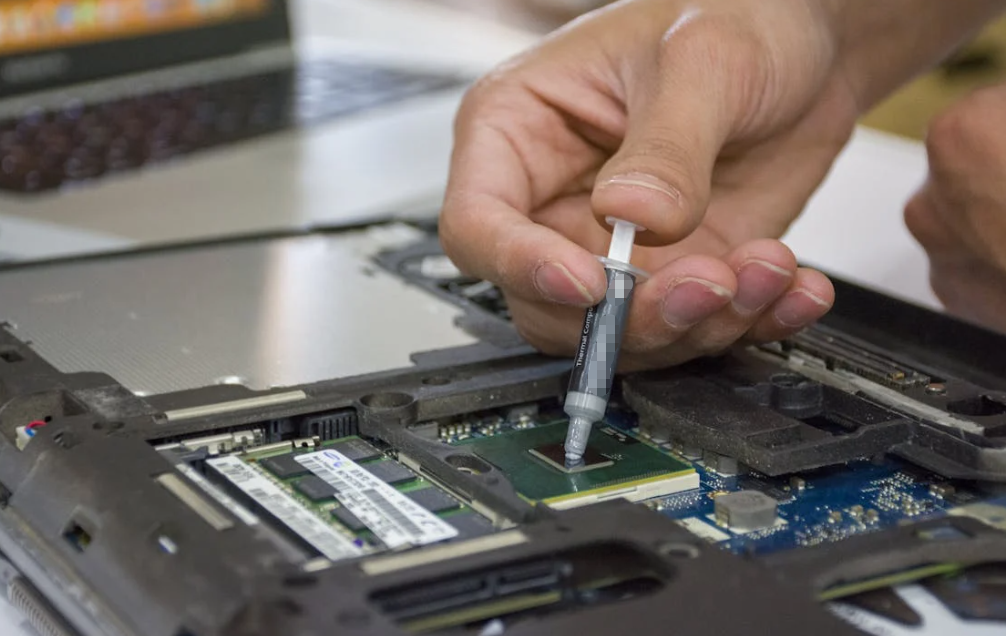
Once applied on a CPU, GPU, or other device, thermal paste doesn’t last indefinitely. Its durability depends heavily on operating conditions, heat cycles, and paste quality.
Typical Longevity Estimates
Across multiple expert sources and real‑world observations:
- Standard desktop use: Thermal paste can remain effective from 2 to 5 years under normal conditions.
- High‑performance or overclocked systems: Lifespan may shorten to 2–3 years or less due to increased temperature stress.
- Premium compounds: High‑quality thermal pastes can sometimes perform up to 7 years or more if heat cycles are moderate and temperatures are controlled.
- Extreme workloads/24/7 systems: If a system runs continuously under heavy loads, thermal paste may degrade faster, requiring earlier replacement.
The variation exists because thermal paste degrades chemically and physically over time, especially due to repeated heating and cooling (thermal cycling). This can cause it to dry, pump out from between surfaces, or lose contact efficiency.
What Affects Thermal Paste Lifespan?

Let’s break down key factors that impact how long thermal paste effectively performs:
Thermal Cycling and Heat Stress
Every time a system heats up and cools down, thermal paste is compressed and stretched slightly between components. Over thousands of cycles, this can cause the paste to migrate or thin out—a phenomenon known as “pump‑out.”
Component Usage Level
Systems that are idle most of the time, or used lightly, generate less heat and are gentler on thermal paste. Conversely, gaming rigs, rendering stations, and servers running at high load cause more rapid degradation.
Environmental Conditions
Operating in extremely hot environments, poor airflow situations, or dusty conditions can accelerate thermal paste aging. Few things stress thermal compounds like heat buildup with restricted cooling airflow.
Quality and Composition
Different pastes use various base materials—silicone, ceramic particles, metal particles (e.g., silver or copper), or even liquid metal—all with differing stability and longevity. Metal‑based compounds usually offer better thermal conductivity but might degrade faster if not designed for longevity.
Application Method
Even the best compound won’t perform well if applied unevenly or in excessive amounts. That’s because too much paste increases thermal resistance, and too little leaves air gaps that impede heat transfer.
Signs It’s Time to Replace Thermal Paste

Thermal paste may still be “old” but functional—so instead of relying strictly on age, look for signs of diminished performance:
Rising Operating Temperatures
A clear indicator is seeing your CPU or GPU temperatures increasing under the same workload compared to previous baseline readings.
Fan Noise and Thermal Throttling
If your system fans are increasingly loud or your device throttles performance under load, inefficient heat transfer could be to blame.
Visual Indicators
When you remove the heatsink, degraded paste can appear dry, cracked, crumbly, or discolored. These are classic signs that thermal conductivity has suffered.
Industry Recommendations
Based on expert consensus and manufacturer guidance:
- Replace thermal paste every 2–3 years as a preventative routine for most users.
- Check performance annually for high‑performance or critical systems, adjusting replacement cycles from there.
- Always inspect paste when removing the cooler, even before the scheduled interval—once disturbed, the paste no longer provides optimal contact.
Maximizing Thermal Paste Longevity
Here’s how to make the most of your thermal paste:
Good Storage Practices
Unopened tubes should be kept cool, dry, and sealed—not just stuck in a drawer. After opening, clean and reseal the cap to minimize air exposure.
Use Quality Compounds
Cheap pastes may save money upfront, but premium compounds often retain thermal properties longer and provide more consistent heat transfer.
Maintain Good Cooling System Hygiene
Dust buildup and restricted airflow increase component temperatures and stress thermal paste. Regular cleaning of fans and heatsinks extends thermal paste life.
Special Note: Thermal Paste Types and Lifespans
Different thermal paste formulations can affect longevity:
| Paste Type | Typical Lifespan In Use | Notes |
| Silicone/Ceramic | ~2–5 years | Stable, good general purpose |
| Metal Particle | ~2–4 years | Exceptional conductivity but can degrade if not high quality |
| High‑End Premium | ~5–7+ years | Longer lifespan in moderate conditions |
| Liquid Metal | Variable | Excellent performance, can resist pump‑out but risks electrical conductivity |
These should be used with proper precautions and compatible hardware interfaces.
Short Conclusion
Thermal paste does not last forever—but with quality products and correct use, you can expect effective performance for multiple years. On average, most pastes provide optimal heat transfer for about 2–5 years, depending on workload and environmental factors. Monitoring system temperatures and watching for performance changes will give you the best indication of when a paste needs replacement.
At HakTak, we recommend proactive maintenance and using high‑quality thermally conductive solutions to ensure longevity and peak cooling performance across applications.
Frequently Asked Questions (FAQs)
How long should thermal paste last on a CPU?
Typically about 2–5 years under normal usage before performance starts to decline.
Can thermal paste still be used after many years in the tube?
If stored sealed in a cool, dry place, some pastes can remain usable for up to 3–5 years. Use visual checks to confirm consistency.
What’s a sign thermal paste needs replacing?
If your CPU/GPU runs hotter than usual or you see dry or cracked paste under the heatsink.
Does higher usage shorten thermal paste life?
Yes—continuous heavy workloads accelerate degradation more than light or intermittent use.
Should I replace thermal paste when upgrading my cooler?
Yes—any time the heatsink is removed, always clean and reapply fresh paste for best contact.