
If you’ve ever built a PC, repaired a laptop, or worked with thermal interface materials, you’ve probably asked this question at least once: Can you actually use too much thermal paste?
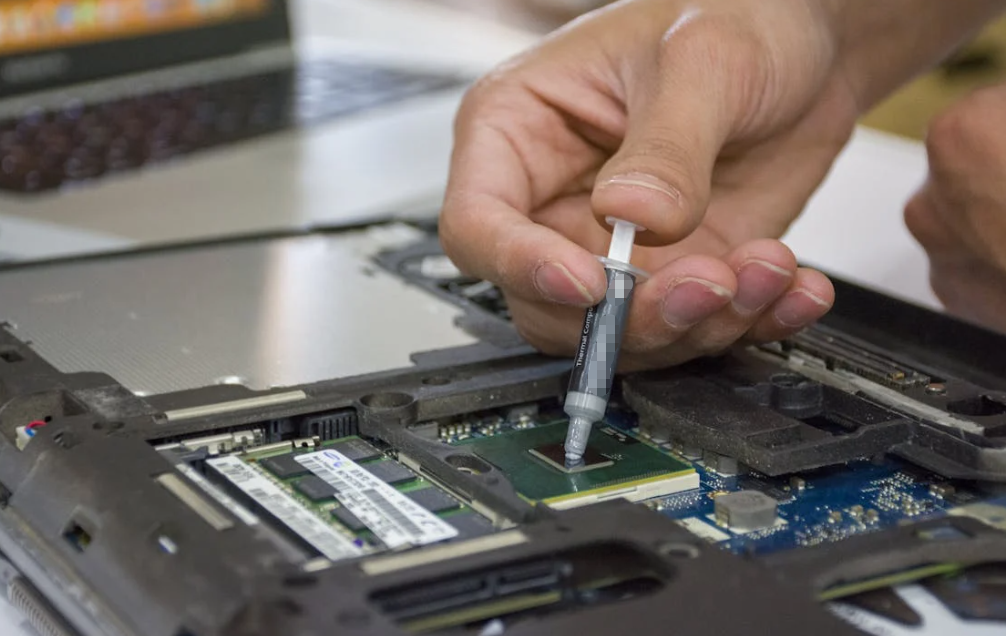
The short answer is… yes—but the real story is more nuanced.
In practice, applying too much thermal paste rarely destroys performance outright. However, under certain conditions, it can subtly reduce cooling efficiency, create long-term reliability risks, or simply make a mess that comes back to haunt you later.
This article breaks it down in detail—drawing from real-world testing, engineering principles, and field experience—so you can understand not just what happens, but why it happens.
What Thermal Paste Actually Does (And Why It Matters)
Before talking about “too much,” we need to understand what thermal paste is supposed to do.
At a microscopic level, neither a CPU heat spreader nor a heatsink base is perfectly flat. Tiny air gaps exist between the two surfaces. Air, unfortunately, is a terrible heat conductor.
Thermal paste solves this problem by filling those microscopic gaps and improving heat transfer from the CPU to the cooler.
It does not replace metal-to-metal contact—it enhances it.
That distinction matters.
Because once the gaps are filled, more paste doesn’t improve anything. In fact, it can start doing the opposite.
The Ideal Amount: Less Than You Think
Most manufacturers and technicians converge on a similar recommendation:
- A pea-sized dot
- Or a small central drop (0.5–1.5 mm thick)
This amount spreads under pressure and forms a thin, efficient thermal layer.
Why so little?
Because thermal paste is less conductive than metal. Its role is to fill imperfections—not to become a thick barrier.
So… What Happens If You Use Too Much?

Let’s get straight to the core question.
Reduced Heat Transfer Efficiency
This is the most important technical consequence.
When too much paste is applied, it creates a thicker layer between the CPU and heatsink, which increases thermal resistance.
Instead of acting as a bridge, the paste starts behaving like an insulator.
In extreme cases:
- Heat transfer slows down
- CPU temperatures rise
- Cooling efficiency drops
That said, in moderate over-application, the real-world impact is often small—sometimes just a 1–3°C difference.
This explains why many users don’t immediately notice a problem.
Thermal Throttling (In Worst Cases)
If the paste layer becomes excessively thick—or uneven—you can run into a bigger issue: thermal throttling.
When CPUs overheat, they automatically reduce performance to protect themselves.
Excess paste can contribute to this by:
- Trapping heat
- Preventing proper contact
- Creating uneven heat distribution (hotspots)
This doesn’t happen often—but when it does, performance drops become noticeable.
Uneven Spreading and Air Pockets
Ironically, more paste can sometimes lead to worse coverage.
Why?
Because excess material:
- Doesn’t always spread evenly
- Can trap air bubbles
- Creates inconsistent thermal contact
Air pockets are especially problematic because air is a poor conductor of heat.
This leads to localized hotspots—one of the hidden causes of unstable temperatures.
Overflow and Contamination
This is the most visible side effect.
When you mount the heatsink:
- Excess paste gets squeezed out
- It spills onto the CPU socket or motherboard
In many cases, this is just messy. But there’s a catch.
Some thermal pastes—especially metal-based ones—are electrically conductive. If they spill onto sensitive components, they can cause short circuits.
Most consumer-grade pastes are non-conductive, but not all. Always check.
Long-Term Reliability Risks
Even if your system runs fine initially, too much paste can introduce long-term issues:
- Pump-out effect (paste gradually pushed out over time)
- Material degradation
- Harder maintenance and cleaning
A thick layer is simply less stable over repeated heating and cooling cycles.
The Surprising Truth: Too Much Is Often Less Dangerous Than Too Little
Here’s where things get interesting.
Despite all the risks, many real-world tests and user experiences show:
Too much paste usually causes minor inefficiency. Too little paste causes major problems.
Why?
Because insufficient paste leaves air gaps, which drastically reduce heat transfer.
In fact, even enthusiasts often say:
- Too much = slightly worse
- Too little = significantly worse
This aligns with engineering logic and field reports.
Real-World Observations (From Builders and Technicians)
Across forums, repair shops, and DIY communities, a pattern emerges:
- Slight over-application → negligible performance loss
- Severe over-application → measurable temperature increase
- Under-application → immediate overheating
Here’s a typical sentiment from experienced builders:
“Too much paste is mostly messy. Too little is where problems start.”
And in many troubleshooting cases, high temperatures are more often caused by:
- Poor cooler mounting
- Uneven pressure
- Old or degraded paste
—not just “too much paste.”
Does It Affect CPU Performance Directly?
Technically, thermal paste does not directly affect performance.
Instead, it affects temperature.
And temperature affects performance only if it triggers:
- Thermal throttling
- System instability
So the chain looks like this:
Too much paste → poorer heat transfer → higher temps → possible throttling → reduced performance
If your CPU stays within safe temperatures, performance may remain unchanged.
Special Case: High-Performance and Industrial Applications
In high-density electronics—like servers, GPUs, or industrial systems—the margin for error is smaller.
Here, excessive paste can:
- Increase thermal resistance significantly
- Disrupt precision-mounted cooling systems
- Affect long-term reliability
For brands like HakTak that specialize in thermally conductive materials, consistency and application control become critical.
In these environments, “a little too much” isn’t just messy—it can affect system efficiency at scale.
Best Practices for Applying Thermal Paste
To avoid all these issues, follow a few simple rules:
Use the Right Amount
- Pea-sized dot (most CPUs)
- Thin line (larger dies)
Let Pressure Do the Work
Do not manually spread unless required. The heatsink distributes the paste evenly.
Avoid Overthinking Patterns
Crosses, X-shapes, and spirals rarely outperform simple methods.
Check Paste Type
- Non-conductive = safer
- Metal-based = higher risk if spilled
Reapply When Necessary
- After removing the heatsink
- Every few years (depending on paste quality)
Common Myths (Debunked)
“More paste = better cooling”
False. Paste is less conductive than metal.
“Too much paste will destroy your CPU”
Rare. Only extreme misuse or conductive paste causes real danger.
“It doesn’t matter how much you use”
Also false. It does matter—just not as dramatically as some believe.
Conclusion
Applying too much thermal paste can affect performance—but usually only slightly.
In most real-world scenarios:
- The impact is minimal
- The biggest issue is mess and inefficiency
However, in extreme cases, over-application can:
- Increase temperatures
- Cause thermal throttling
- Introduce long-term risks
The key takeaway is simple:
Thermal paste is a precision material—not a “more is better” solution.
A small, controlled amount will always outperform a thick, excessive layer.
FAQs
Does too much thermal paste cause overheating?
Yes, but usually only slightly unless the layer is very thick.
Is it better to use too much or too little?
Slightly too much is safer than too little, which can create air gaps.
Can too much thermal paste damage a CPU?
Rarely. Only if it causes overheating or electrical shorting.
Will excess paste leak out?
Yes, it often gets squeezed out when mounting the cooler.
Do all thermal pastes conduct electricity?
No. Most are non-conductive, but some high-performance types are conductive.