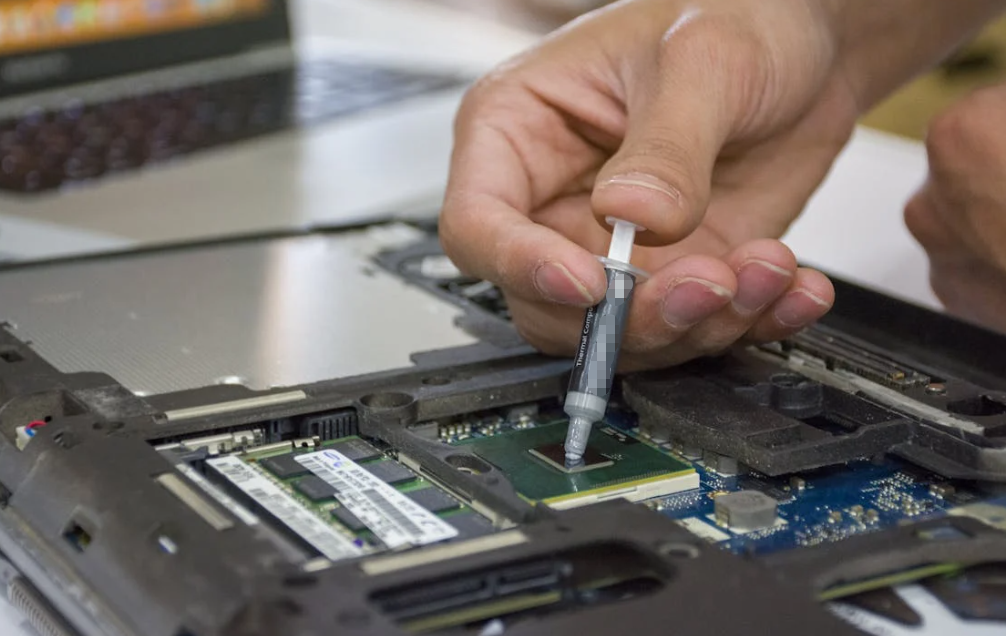
Choosing thermal paste sounds simple—until you realize how many options, specs, and marketing claims are out there. A quick search will flood you with numbers like “12.5 W/m·K,” buzzwords like “nano particles,” and even exotic options like liquid metal. So how do you actually choose the Phải one?

This guide cuts through the noise. Not with generic advice—but with real-world insight, engineering context, and practical selection logic that reflects how professionals actually evaluate vật liệu dẫn nhiệt (TIMs).
What Is Thermal Paste and Why It Matters
Keo tản nhiệt—also called keo tản nhiệt or TIM—is designed to fill microscopic air gaps between a heat source (CPU, GPU, power module) and a heatsink.
Air is a terrible conductor of heat. Thermal paste replaces that air with a material that conducts heat far more efficiently.
Without thermal paste:
- Heat transfer becomes inefficient
- CPU temperatures rise
- Performance throttling may occur
- Long-term hardware reliability decreases
With a high-quality paste properly applied, temperature reductions of up to 10–20°C are possible in real-world scenarios depending on conditions.
The Core Factors When Choosing Thermal Paste

Let’s get practical. These are the parameters that actually matter when selecting thermal paste.
Độ dẫn nhiệt (W/m·K)
This is the most marketed spec—and the most misunderstood.
- Typical range: 3–15 W/m·K
- High-end (liquid metal): >70 W/m·K
Ví dụ:
- Thermal Grizzly Kryonaut Thermal Paste → ~12.5 W/m·K
- Cooler Master CryoFuze Thermal Paste → ~14 W/m·K
Nhưng đây là điểm tế nhị:
A higher number does NOT always mean significantly better real-world cooling.
Tại sao?
- Application thickness matters more
- Mounting pressure affects performance
- Surface flatness changes results
In fact, testing across dozens of pastes shows performance differences often within 1–2°C among top products.
Takeaway: Use conductivity as a guideline, not the final decision-maker.
Paste Type (This Matters More Than You Think)
Thermal pastes fall into four major categories:
Silicone-Based (Entry-Level)
- Giá cả phải chăng
- Easy to apply
- Lower performance
- Used in mass-market electronics
Example: generic silicone greases.
Carbon-Based (Best All-Rounders)
- Không dẫn điện
- Stable over time
- Good performance
Example:
- ARCTIC MX-4 Thermal Compound
These are the sweet spot for most users.
Metal-Based (High Performance)
- Contains silver or metal oxides
- Higher conductivity
- Slightly more complex application
Example:
- Noctua NT-H1 Thermal Paste
Liquid Metal (Extreme Performance)
- Extremely high conductivity (~73 W/m·K)
- Electrically conductive (risk!)
- Can damage aluminum
Example:
- Thermal Grizzly Conductonaut Liquid Metal
Quan trọng: Liquid metal is for experts only.
Viscosity and Ease of Application
Viscosity determines how the paste spreads.
- Too thick → uneven coverage
- Too thin → pump-out over time
Good examples of balanced viscosity:
- Corsair TM30 Thermal Paste (easy application)
- Corsair XTM60 Thermal Paste (controlled spread)
Professionals often prioritize application consistency over raw conductivity numbers.
Long-Term Stability (Often Ignored)
This is where many cheap pastes fail.
Over time, poor-quality paste can:
- Dry out
- Crack
- “Pump out” under thermal cycling
High-quality pastes maintain performance for years without degradation.
For instance:
- Corsair TM30 Thermal Paste is designed for long-term durability
If you’re building systems for customers or industrial use, this factor is critical.
Electrical Conductivity (Safety Factor)
- Non-conductive = safe for beginners
- Conductive = risk of short circuits
Most mainstream pastes (MX-4, Kryonaut, NT-H1) are non-conductive.
Liquid metal is conductive → use with caution.
Dải nhiệt độ hoạt động
If your application involves:
- Điện tử công nghiệp
- Bộ điều khiển ô tô
- Mô-đun nguồn
You’ll need paste that performs under extreme conditions.
Example:
- Thermal Grizzly Kryonaut Thermal Paste supports extreme temperature ranges
Price vs Performance
Here’s the truth:
The difference between a $7 paste and a $25 paste is often just 1–3°C.
Ví dụ:
- Budget: ARCTIC MX-4 Thermal Compound
- Premium: Thermal Grizzly Kryonaut Extreme
Unless you’re overclocking heavily, mid-range paste is usually sufficient.
Best Thermal Paste Options by Use Case

Let’s break this down practically.
Best Overall (Balanced Performance + Price)
ARCTIC MX-4 Thermal Compound
$7.09•Walmart – KOSATRUR + others
4.8(3.8k)
$7.09•Walmart – KOSATRUR + others•
4.8(3.8k)
Why it works:
- Không dẫn điện
- Stable for years
- Easy to apply
- Proven reliability across CPUs and GPUs
Best for High Performance / Overclocking
Thermal Grizzly Kryonaut Thermal Paste · $31.99 · 4.8
A high-performance keo tản nhiệt engineered for demanding CPUs and overclocking scenarios.
Why:
- High conductivity (~12.5 W/m·K)
- Designed for extreme cooling
- Popular among enthusiasts
Best Budget Option
Corsair TM30 Thermal Paste · $7.99 · 4.8
An affordable and reliable thermal paste with easy application and solid long-term stability.
Why:
- Great value
- Reliable long-term performance
- Ideal for everyday builds
Best for Experts (Maximum Cooling)
Thermal Grizzly Conductonaut Liquid Metal · $14.99 · 4.7
A liquid metal thermal interface delivering extreme conductivity for advanced users and overclocking.
Why:
- Ultra-high conductivity (~73 W/m·K)
- Best thermal performance possible
- Requires careful handling
PRODUCT COMPARISON TABLE
| Attribute | ARCTIC MX-4 Thermal Compound$7.09•Walmart – KOSATRUR + others | Thermal Grizzly Kryonaut Thermal Paste$31.99•Micro Center + others | Corsair TM30 Thermal Paste$7.99•Best Buy + others | Thermal Grizzly Conductonaut Liquid Metal$14.99•Micro Center + others |
| Loại | Dựa trên carbon | Metal-based compound | Gốc silicone | Kim loại lỏng |
| Độ dẫn nhiệt | ~8.5 W/m·K | ~12.5 W/m·K | — | ~73 W/m·K |
| Độ dẫn điện | Không | Không | Không | Vâng |
| Dễ sử dụng | Very easy | Dễ | Very easy | Khó |
| Longevity | Tuyệt vời | Tuyệt vời | Rất tốt | Vừa phải |
| Best For | General use | Overclocking | Budget builds | Extreme performance |
| Risk Level | Very low | Thấp | Very low | Cao |
How to Choose Based on Your Scenario
Let’s simplify:
- Office PC / Standard Use → MX-4, TM30
- Gaming PC → Kryonaut, XTM60
- Overclocking → Kryonaut Extreme or liquid metal
- Industrial / OEM Manufacturing → prioritize stability + consistency
- Beginners → avoid liquid metal
Những sai lầm phổ biến cần tránh
- Using too much paste
- Choosing based only on W/m·K
- Ignoring long-term stability
- Mixing incompatible materials
- Using liquid metal on aluminum heatsinks
Kết luận ngắn gọn
Choosing thermal paste is less about chasing the highest spec—and more about matching the material to your real-world use case.
For most users, a reliable, non-conductive paste like MX-4 is more than enough. High-end options only make sense when pushing hardware to its limits. And liquid metal? That’s a specialist tool, not a default choice.
In thermal management, consistency beats extremes.
Câu hỏi thường gặp
Does thermal paste brand really matter?
Yes—but only slightly. Most reputable brands perform within a few degrees of each other.
How often should I replace thermal paste?
Typically every 2–5 years, depending on quality and usage.
Is liquid metal worth it?
Only for experienced users. It offers better performance but comes with higher risk.
How much thermal paste should I apply?
A small pea-sized amount is usually sufficient.
Can thermal paste go bad?
Yes. Over time it can dry out and lose effectiveness, especially low-quality products.