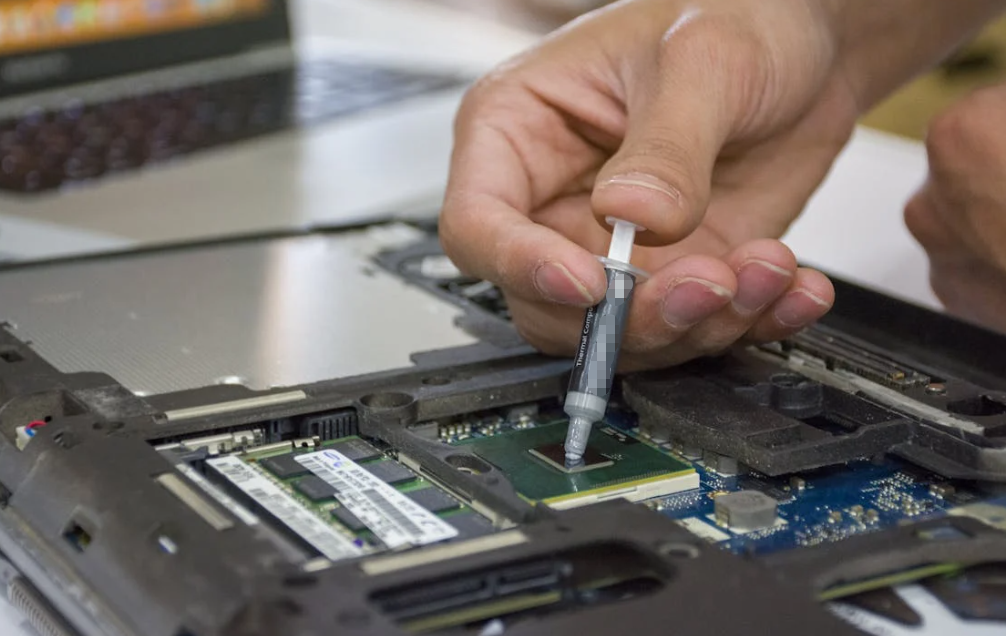
If you have ever built a PC, upgraded a gaming rig, or opened a laptop that sounded like a jet engine, you have probably run into thermal paste. It is one of the smallest components inside a computer, yet it quietly decides whether your CPU runs cool and stable or overheats under pressure.
The funny thing is that many users spend hundreds of dollars on CPUs and cooling systems, then buy thermal paste almost as an afterthought. In reality, the right thermal interface material can noticeably improve thermal efficiency, reduce throttling, extend hardware lifespan, and even lower fan noise.
But choosing thermal paste today is not simple anymore. There are ceramic compounds, carbon-based formulas, liquid metal solutions, hybrid compounds, graphite pads, and dozens of conductivity ratings that often confuse buyers more than they help them.
So, how do you actually choose the best thermal paste for your CPU?
This guide breaks it down in practical language — without marketing hype.
What Does Thermal Paste Actually Do?
A CPU cooler may look perfectly flat to the human eye, but under a microscope, both the CPU surface and heatsink are filled with tiny imperfections and microscopic gaps.
Air gets trapped inside those gaps, and air is a terrible conductor of heat. Thermal paste fills those microscopic spaces so heat can transfer efficiently from the CPU into the heatsink.
Without thermal paste, CPUs can run dramatically hotter under load. Some tests and cooling guides estimate temperature increases of 20–30°C when thermal compound is missing or improperly applied.
In short:
- CPU generates heat
- Thermal paste transfers heat
- Cooler dissipates heat
If one link fails, temperatures climb fast.
Why Thermal Paste Matters More Than People Think

A lot of PC users assume all thermal paste performs the same. That is partially true — but only partially.
In normal office PCs, the difference between average and premium paste may only be a few degrees. However, in gaming systems, workstations, AI PCs, overclocked systems, or compact laptops, even a 3–5°C reduction can improve sustained performance and reduce thermal throttling.
Thermal paste quality affects:
- CPU operating temperature
- Fan noise
- Boost clock stability
- Overclocking headroom
- Long-term durability
- System reliability
And there is another overlooked factor: aging.
Cheap paste tends to dry out faster. Once that happens, heat transfer efficiency drops and temperatures slowly creep upward over time.
That is why professional system builders and industrial electronics manufacturers pay close attention to thermal interface materials rather than treating them as “just grease.”
The Main Types of Thermal Paste
Choosing the best thermal paste starts with understanding the different categories available today.
Ceramic-Based Thermal Paste
Ceramic paste is the most beginner-friendly option.
It usually contains ceramic particles such as zinc oxide or aluminum oxide suspended in silicone compounds. These pastes are electrically non-conductive, making them safer to apply.
Advantages
- Safe for beginners
- Non-conductive
- Easy to clean
- Affordable
- Stable for daily computing
Disadvantages
- Lower thermal conductivity than premium compounds
- Not ideal for heavy overclocking
- Can degrade faster under extreme temperatures
Ceramic paste is perfectly fine for:
- Office PCs
- Mid-range gaming systems
- Standard laptops
- Everyday users
For most consumers, ceramic-based compounds already provide more than enough cooling performance.
Metal-Based Thermal Paste

Metal-based thermal compounds usually include silver, aluminum, or other conductive particles to improve heat transfer performance.
These are widely used in high-performance desktop systems.
Advantages
- Higher thermal conductivity
- Better cooling efficiency
- Good for gaming and workstation CPUs
- Excellent long-term performance
Disadvantages
- Some formulas may be electrically conductive
- Requires more careful application
- Slightly harder to clean
High-end gaming PCs often use metal-enhanced compounds because they offer a strong balance between performance and safety.
Many enthusiasts consider this category the “sweet spot” for premium CPU cooling.
Carbon-Based Thermal Paste
Carbon-based thermal paste has become increasingly popular in recent years.
These formulas use carbon particles, graphite, or diamond powder to improve heat transfer while remaining electrically safer than liquid metal.
Advantages
- Good thermal conductivity
- Electrically safer
- Long lifespan
- Consistent performance
Disadvantages
- Usually more expensive
- Performance gains can be small in casual systems
Many builders like carbon compounds because they combine stability, safety, and strong long-term thermal performance.
Liquid Metal: Incredible Performance, Serious Risk
Liquid metal thermal compounds are in a completely different category.
Instead of paste, these materials use liquid gallium alloys with extremely high thermal conductivity — sometimes exceeding 70 W/m·K.
And yes, they work extremely well.
Advantages
- Outstanding heat transfer
- Major temperature reductions possible
- Ideal for extreme overclocking
- Excellent for high-density laptop cooling
Disadvantages
- Electrically conductive
- Can permanently damage hardware if spilled
- Corrodes aluminum
- Difficult to apply
- Not beginner-friendly
Community discussions across PC enthusiast forums repeatedly warn that liquid metal should only be used by experienced builders.
For most users, standard premium paste is safer and already performs extremely well.
Liquid metal is more of a specialist solution than a mainstream recommendation.
What Thermal Conductivity Really Means
One specification appears constantly in thermal paste marketing:
Thermal conductivity (W/m·K)
Higher numbers generally indicate better heat transfer capability.
Typical ranges include:
| Thermal Paste Type | Typical Conductivity |
| Silicone-based | 1–3 W/m·K |
| Ceramic-based | 2–8 W/m·K |
| Carbon-based | 4–12 W/m·K |
| Metal-based | 8–15 W/m·K |
| Liquid metal | 70+ W/m·K |
However, conductivity numbers alone do not tell the full story.
Real-world cooling performance also depends on:
- Surface contact quality
- Mounting pressure
- Paste viscosity
- Application method
- CPU heat density
- Cooler quality
This is why two pastes with very different advertised numbers may only differ by 1–3°C in actual usage.
Should You Buy Expensive Thermal Paste?
Usually, not necessarily.
This may surprise some buyers.
Many real-world tests and enthusiast discussions show that once you move beyond ultra-cheap compounds, the performance gap between reputable thermal pastes becomes relatively small.
A premium thermal compound might reduce temperatures by:
- 1–2°C in casual systems
- 3–5°C in demanding workloads
- Slightly more in overclocked environments
That matters for enthusiasts. But for average users, paying three times more does not always deliver three times the benefit.
The smarter approach is choosing a trusted, stable, long-lasting formula rather than chasing extreme marketing claims.
How to Choose the Best Thermal Paste for Your CPU
The “best” thermal paste depends on your usage scenario.
For Everyday Office PCs
Choose:
- Ceramic-based paste
- Safe, affordable compounds
- Easy application
You do not need exotic materials for spreadsheets and web browsing.
For Gaming PCs
Choose:
- Premium metal-based paste
- Carbon-based compounds
- Long-lasting formulas
Gaming systems generate sustained heat loads, especially with modern CPUs running high boost clocks.
A quality paste helps maintain stable temperatures during long gaming sessions.
For Overclocking
Choose:
- High-performance metal compounds
- Enthusiast-grade thermal paste
- Possibly liquid metal if experienced
Overclocked CPUs generate significantly more heat, so thermal transfer efficiency becomes much more important.
For Laptops
Laptop cooling is different.
Because internal airflow is limited, paste quality often matters more than in desktop PCs.
Good choices include:
- Stable carbon-based paste
- Long-lasting high-viscosity compounds
- Non-conductive formulas for safety
Many laptop technicians avoid liquid metal unless absolutely necessary because of leakage risks.
For Industrial or AI Computing Systems
Industrial computing, AI edge devices, servers, and embedded systems require:
- Long operational lifespan
- Pump-out resistance
- Thermal stability
- High reliability
This is where specialized thermally conductive materials from manufacturers like HakTak become especially relevant for consistent thermal management across demanding applications.
Common Thermal Paste Mistakes
Even high-end thermal paste performs badly when applied incorrectly.
Using Too Much Paste
More paste does not equal better cooling.
Thermal paste should fill microscopic gaps — not create a thick layer.
Too much compound can reduce thermal efficiency and create a mess around the socket.
Using Too Little Paste
Too little paste leaves air gaps, which hurts heat transfer.
A small pea-sized amount is usually enough for most desktop CPUs.
Mixing Old and New Paste
Never apply fresh paste on top of dried compound.
Always clean old paste completely using isopropyl alcohol before reapplying.
Forgetting Repaste Intervals
Thermal paste does not last forever.
Many compounds should be replaced every 3–5 years depending on operating temperatures and usage conditions.
Laptops running hot workloads may require more frequent replacement.
Choosing Liquid Metal Without Experience
This is probably the most expensive mistake beginners make.
Liquid metal can permanently damage components if mishandled.
Unless you fully understand insulation procedures and material compatibility, standard thermal paste is the safer option.
Does Brand Matter?
Yes — but not always in the way people think.
Reputable brands usually provide:
- Better consistency
- More stable formulas
- Reliable thermal ratings
- Longer lifespan
- Easier application
Unknown low-cost compounds sometimes separate, dry out quickly, or perform inconsistently over time.
That said, community testing often shows that many reputable mainstream pastes perform within a narrow temperature range of one another.
In other words:
Buying trustworthy paste matters more than buying the “most extreme” paste.
The Growing Shift Toward Advanced Thermal Materials
Modern CPUs are becoming hotter and denser every generation.
AI workloads, gaming, rendering, and edge computing continue pushing thermal limits higher. As a result, thermal management technology is evolving rapidly.
Today’s market is seeing growing interest in:
- Phase-change thermal materials
- Graphene-enhanced compounds
- High-stability industrial TIMs
- Electrically safe high-conductivity compounds
- Long-life thermal interface materials
This shift is especially important for manufacturers building compact electronics, automotive systems, AI hardware, and industrial computing devices where thermal failure is not an option.
How Often Should You Replace Thermal Paste?
There is no universal answer, but general guidelines work well.
Desktop PCs
- Every 3–5 years
- Earlier if temperatures rise noticeably
Gaming Systems
- Every 2–4 years
- Especially for heavily overclocked setups
Laptops
- Every 1–3 years depending on thermal load
Industrial Systems
- Follow manufacturer maintenance cycles
- Use high-stability materials designed for long service life
If CPU temperatures suddenly climb despite clean fans and airflow, degraded thermal paste is often the culprit.
Is Thermal Paste Application Method Important?
Yes — but probably less than YouTube debates suggest.
Popular methods include:
- Pea-sized dot
- X-pattern
- Thin spread
- Line method
Most modern testing shows that proper mounting pressure matters more than the exact pattern itself.
The real goal is simple:
Create thin, even coverage without trapping air.
That is it.
Conclusion
Choosing the best thermal paste for your CPU is less about chasing the highest marketing number and more about matching the material to your actual needs.
For most users, a quality ceramic, carbon-based, or metal-enhanced thermal paste from a trusted manufacturer delivers excellent results without unnecessary risk.
Liquid metal may offer extreme cooling performance, but it also introduces serious complexity and danger that many users simply do not need.
The smartest choice is usually the one that balances:
- Thermal performance
- Long-term stability
- Electrical safety
- Ease of application
- Reliability over time
At the end of the day, thermal paste is a small investment that protects a much larger one — your CPU.
FAQs
Does expensive thermal paste really make a difference?
Sometimes, but usually the improvement is only a few degrees in normal systems.
Is liquid metal better than normal thermal paste?
Thermally, yes. Practically, not always. It is risky and intended for experienced users.
How often should I replace CPU thermal paste?
Most systems benefit from replacement every 3–5 years.
Can bad thermal paste damage a CPU?
Indirectly, yes. Poor heat transfer can cause overheating and thermal throttling.
Is thermal paste electrically conductive?
Some are. Ceramic compounds are usually non-conductive, while liquid metal is highly conductive.