Nous avons tendance à considérer les déchets électroniques comme un problème qui commence lorsqu’un appareil est jeté. À ce moment-là, pourtant, l’histoire touche presque à sa fin. La question la plus utile est de savoir ce qui s’est passé au cours des années, des mois ou parfois des semaines ayant précédé l’arrivée de cet appareil dans la poubelle.

Il se peut que le ventilateur d’un ordinateur portable soit devenu suffisamment bruyant pour interrompre les réunions. Il se peut aussi que la batterie d’un téléphone ait commencé à se décharger plus rapidement après plusieurs étés particulièrement chauds. Ou qu’un ordinateur de jeu ait perdu en performances au cours de longues sessions. Dans un bureau ou une usine, il est également possible qu’une alimentation soit tombée en panne prématurément et ait été remplacée dans son ensemble, parce que son diagnostic coûtait plus cher que la commande d’une nouvelle unité.
Ces problèmes semblent distincts. Très souvent, la chaleur intervient en arrière-plan.
La chaleur n’est évidemment pas la seule cause des défaillances électroniques. L’humidité, les vibrations, les contraintes électriques, la contamination et la simple malchance jouent également un rôle. La température influe néanmoins sur presque toutes les couches d’un système électronique. Elle modifie le comportement des batteries, accélère le vieillissement des matériaux, augmente l’utilisation des ventilateurs et peut amener les processeurs à réduire leur propre vitesse. Elle rend également les petits compromis de conception plus coûteux au fil du temps.
Cela pose un problème de durabilité dont nous ne parlons pas assez. Un appareil qui fonctionne à une température plus élevée peut consommer davantage d’énergie pour son refroidissement, offrir des performances moins constantes, nécessiter une maintenance plus précoce et devenir plus rapidement un déchet. Une meilleure conception thermique ne peut pas résoudre à elle seule tout le problème des déchets électroniques, mais elle peut contribuer à prolonger la durée d’utilisation des produits. C’est déjà un bon point de départ.
La chaleur ne se contente pas de rendre un appareil inconfortable
Lorsque l’on dit qu’un appareil “ chauffe ”, on veut souvent dire que son boîtier est chaud au toucher. La température de surface est importante pour l’utilisateur, mais les ingénieurs surveillent généralement plusieurs températures à l’intérieur du produit. La jonction d’un processeur, une cellule de batterie, un transistor de puissance et un boîtier en plastique peuvent tous avoir des limites différentes.

Les processeurs modernes disposent de mécanismes d’autoprotection. Lorsque la température atteint un seuil de régulation, le dispositif peut réduire sa puissance ou sa fréquence d’horloge. C’est ce que l’on appelle la limitation thermique. Celle-ci évite les dommages immédiats, mais signifie également que le produit n’offre plus les performances pour lesquelles il a été conçu ou acheté.
Les systèmes de refroidissement réagissent eux aussi. Les ventilateurs tournent plus vite. Les pompes sont davantage sollicitées. Dans un centre de données, le système de refroidissement des installations doit évacuer la chaleur rejetée par des milliers de serveurs. À plus petite échelle, un ordinateur portable dont les entrées et sorties d’air sont obstruées peut passer une grande partie de sa durée de vie avec son ventilateur tournant à plein régime. Le ventilateur accumule alors de la poussière et s’use davantage. Un problème finit ainsi par en aggraver un autre.
L’exposition prolongée à la chaleur modifie également les matériaux. Les adhésifs peuvent ramollir ou perdre de leur résistance. Les polymères peuvent durcir. Les composés thermiques peuvent migrer, se dessécher ou perdre le contact. La chimie des batteries vieillit plus rapidement à température élevée. Les joints de soudure se dilatent et se contractent au fil des cycles répétés d’échauffement et de refroidissement des équipements.
Rien de tout cela ne signifie qu’un appareil chaud est sur le point de tomber en panne. Les appareils électroniques sont conçus pour fonctionner dans différentes plages de température. Le problème vient de la chaleur excessive et inutile : une élévation de température due à un chemin thermique insuffisant, à un mauvais contact, à une circulation d’air obstruée ou à une solution de refroidissement qui ne fonctionne que dans des conditions idéales.
Les petits interstices d’air qui créent un problème majeur
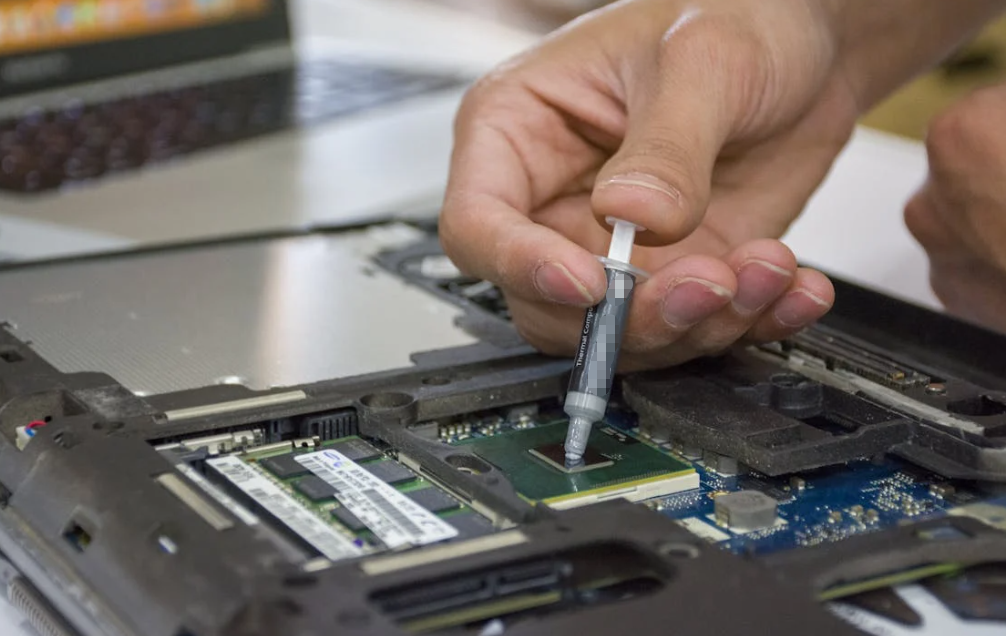
À l’intérieur d’un produit électronique, la chaleur traverse généralement plusieurs interfaces avant d’atteindre l’air ambiant ou le système de refroidissement liquide. Une puce peut transmettre la chaleur au couvercle du boîtier, puis, par l’intermédiaire d’un matériau d’interface thermique, à un diffuseur thermique, un dissipateur thermique ou une plaque froide.

Les surfaces métalliques peuvent sembler parfaitement lisses, mais elles présentent des aspérités et des creux lorsqu’on les observe à la loupe. Lorsque deux pièces métalliques sèches sont mises en contact, elles ne se touchent qu’au niveau de certaines aspérités. De minuscules poches d’air subsistent entre elles. L’air est utile pour l’isolation, ce qui explique précisément pourquoi sa présence est indésirable dans une voie de transfert thermique haute performance.
Les matériaux d’interface thermique servent à remplacer ces poches d’air et à assurer le contact entre des surfaces imparfaites. Cette famille comprend les graisses thermiques, les pads souples, les films à changement de phase, les gels et les adhésifs thermoconducteurs. Chaque format répond à un problème mécanique légèrement différent. Une graisse peut mouiller un joint très fin sous pression. Un pad souple peut combler un écart plus important entre des composants de hauteurs différentes. Un matériau à changement de phase peut être manipulé à l’état solide et se ramollir lorsque l’assemblage chauffe.
Pour les lecteurs qui souhaitent comprendre les bases de l’ingénierie sans se retrouver face à un mur de formules, cette explication de Comment fonctionnent les matériaux d’interface thermique entre les surfaces électroniques fournit des informations générales utiles.
Le point essentiel est simple : le refroidissement ne consiste pas seulement à ajouter un ventilateur plus grand. La chaleur doit d’abord s’évacuer du composant. Si le chemin de contact est incomplet, un débit d’air accru peut traiter le symptôme tout en laissant le goulet d’étranglement en place.
La conception durable commence avant la poubelle de recyclage
Le recyclage bénéficie d’une grande attention parce qu’il est visible. Les produits sont collectés, triés et décomposés. Pourtant, le recyclage reste une activité de fin de vie. Prolonger la durée d’utilisation peut retarder cette fin et réduire dès le départ le nombre de produits de remplacement à fabriquer.
Thermal design supports longer life in several ways.
First, it can reduce temperature stress on components and nearby materials. Second, it can help a device maintain performance, making the owner less likely to replace something that feels slow or unreliable. Third, a stable cooling system may reduce fan noise and wear. Finally, better temperature control can make maintenance intervals more predictable.
This does not mean the coolest possible design is always the greenest. Oversized heat sinks use more metal. Powerful fans consume energy and add parts that may fail. Liquid loops add pumps, fittings and service requirements. A good design balances operating temperature, material use, energy, cost, weight and expected life.
Cet équilibre est important. La durabilité ne s’obtient pas en maximisant un seul indicateur. Elle résulte de la conception d’un système qui remplit sa fonction sans gaspiller de ressources ni créer de points de défaillance évitables.
La réparabilité et le refroidissement sont étroitement liés
Les discussions autour de la réparation portent souvent sur les vis, les batteries, les pièces détachées et l’assistance logicielle. Les interfaces thermiques méritent elles aussi d’être prises en compte dans cette réflexion.
Certains produits sont faciles à ouvrir, mais difficiles à remonter correctement. Un pad thermique peut se déchirer lors du retrait du capot. Plusieurs pads peuvent sembler presque identiques tout en ayant des épaisseurs différentes. Un technicien peut remplacer un pad de 1.5 millimètre par un modèle de 1 millimètre, refermer le boîtier et constater des températures normales au repos. En charge, le pad le plus fin peut ne pas du tout entrer en contact avec le système de refroidissement.
L’erreur inverse est également possible. Un pad trop épais peut exercer une pression excessive, déformer une carte ou empêcher un autre composant d’entrer en contact avec le dissipateur thermique. Une quantité supérieure de matériau n’est pas nécessairement plus sûre.
Une conception thermique facilitant la réparation peut inclure :
- des emplacements et des épaisseurs de pads clairement documentés ;
- des matériaux pouvant être remplacés sans avoir à gratter des surfaces fragiles ;
- éléments de fixation générant une pression reproductible ;
- éléments d’inspection indiquant si le contact a été établi ;
- pièces thermiques de rechange fournies avec les kits de maintenance ;
- un accès physique suffisant pour nettoyer et remonter correctement l’interface.
Ces détails n’ont rien de spectaculaire. Pourtant, ils peuvent déterminer si un produit sera remis en service ou finira dans une boîte de pièces pourtant encore fonctionnelles.
Le calcul haute performance rend le problème plus difficile à ignorer
L’intelligence artificielle a placé la gestion thermique sur le devant de la scène. Les accélérateurs haute puissance concentrent une capacité de calcul considérable sur de petites surfaces. La chaleur ne provient pas uniquement du processeur principal. La mémoire, les régulateurs de tension, les équipements réseau et les étages de conversion de puissance y contribuent également.
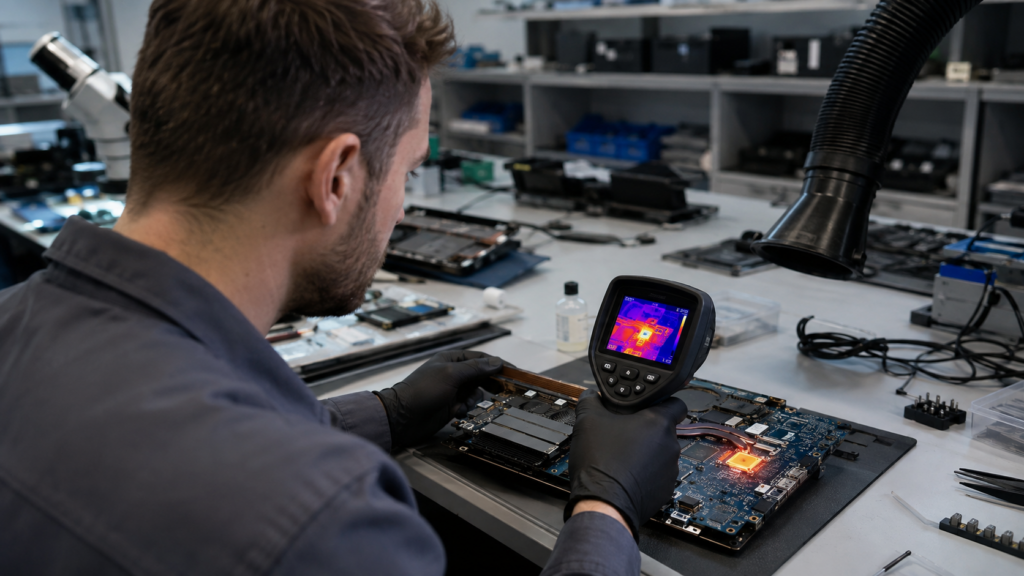
Le refroidissement de ces systèmes repose sur une chaîne de transfert thermique. La puce transmet la chaleur à une interface, puis à une plaque froide ou à un dissipateur thermique, ensuite à l’air ou au fluide de refroidissement, avant qu’elle ne soit finalement évacuée hors du bâtiment. Toute restriction dans cette chaîne augmente la température ou l’énergie nécessaire pour évacuer la même quantité de chaleur.
Les contraintes mécaniques sont également hétérogènes. Un processeur peut nécessiter une interface extrêmement mince, tandis que les modules de mémoire environnants requièrent des pads souples pour compenser des différences de hauteur plus importantes. L’utilisation d’un matériau unique simplifierait l’assemblage, mais donnerait rarement le meilleur résultat.
La même logique est présentée dans un guide détaillé sur pads thermiques pour serveurs d’IA et GPU haute puissance: la conductivité compte, mais l’épaisseur, la compression, le comportement électrique et l’espace réel comptent également.
Les centres de données en sont un exemple spectaculaire, mais ce principe s’applique aussi aux produits courants. Un routeur compact, un éclairage LED, un contrôleur de véhicule et un dispositif de recharge comportent tous plusieurs zones thermiques. Considérer le produit comme ayant une seule température peut masquer des points chauds locaux qui accélèrent son vieillissement.
Pourquoi des valeurs de conductivité plus élevées peuvent être trompeuses
Les matériaux thermiques sont souvent comparés sur la base de leur conductivité, mesurée en watts par mètre-kelvin. Il s’agit d’une propriété importante, mais elle ne suffit pas à déterminer les performances globales du produit.
Imaginez deux ponts. L’un est construit avec un excellent matériau, mais il est deux fois plus long. L’autre utilise un matériau moins performant, mais il est beaucoup plus court et offre un meilleur contact à ses deux extrémités. Quel pont permet de faire circuler le trafic plus rapidement ? Il vous faut davantage d’informations.
Le transfert thermique à travers une interface fonctionne de manière similaire. Un pad épais à conductivité élevée peut créer davantage de résistance qu’un matériau plus mince à conductivité modérée. Un matériau dur peut ne pas épouser les surfaces, laissant des poches d’air. Un matériau souple peut offrir un excellent contact, mais rendre l’assemblage trop salissant ou subir des déplacements à long terme.
Les ingénieurs tiennent donc compte de l’état du matériau une fois installé :
- épaisseur finale du matériau ;
- surface réelle de contact ;
- pression de montage;
- planéité et rugosité de surface;
- température de fonctionnement;
- exigences d’isolation électrique;
- mouvements lors des cycles thermiques;
- vieillissement sous l’effet de l’humidité, des vibrations ou des produits chimiques.
C’est un enseignement utile qui dépasse le cadre de la conception thermique. Les décisions produit fondées sur un seul chiffre mis en avant déplacent souvent la complexité ailleurs.
Un refroidissement plus intelligent ne signifie pas toujours davantage de matériel
Lorsqu’un appareil surchauffe, la réaction intuitive consiste à augmenter la capacité de refroidissement. C’est parfois la bonne solution. Un dissipateur thermique plus grand, une meilleure circulation de l’air ou une boucle liquide peuvent s’avérer nécessaires. Dans d’autres cas, il vaut mieux rétablir le chemin thermique déjà en place.
Quelques exemples permettent de comprendre clairement la différence.
Un dispositif LED peut avoir un boîtier en aluminium volumineux, mais un mauvais contact entre la carte LED et le boîtier crée des points chauds localisés. Améliorer cette interface permet d’exploiter plus efficacement le métal existant.
Un équipement télécom étanche ne peut pas simplement faire circuler davantage d’air extérieur à travers ses composants électroniques. La chaleur doit être transférée vers le boîtier, qui fait alors partie du système de refroidissement. Des matériaux d’interface souples peuvent relier des composants présentant des différences de hauteur au boîtier métallique tout en assurant une isolation électrique.
Une carte de gestion de batterie peut être installée au-dessus d’une plaque froide avec un jeu variable. Une pâte très fine ne suffirait pas à combler cet espace. Un pad conformable ou un matériau de remplissage d’espace applicable par dosage peut maintenir le contact malgré les tolérances de fabrication.
Dans chaque cas, une stratégie de refroidissement plus pertinente commence par la cartographie du trajet entre la source et la limite de refroidissement finale. Ajouter du matériel avant d’avoir identifié le goulot d’étranglement peut augmenter les coûts et la consommation de matériaux sans résoudre le véritable problème.
La validation, c’est là que les bonnes idées rencontrent les produits réels
Une solution thermique qui fonctionne au stade du prototype peut ne pas tenir en production de série. La hauteur des composants varie. Les vis sont serrées avec des couples différents. Les surfaces accumulent des contaminants. Les pads sont positionnés légèrement hors axe. Les produits sont exposés à des véhicules surchauffés, au stockage au froid, aux vibrations et à des années de cycles thermiques.

C’est pourquoi la sélection des matériaux doit intégrer le processus d’assemblage et le profil de fiabilité. Un plan d’essai pertinent peut mesurer la température à puissance contrôlée, vérifier la couverture de contact, enregistrer la force d’assemblage et répéter les mesures après vieillissement environnemental.
L’objectif n’est pas d’établir la liste d’essais la plus longue possible. Il s’agit de reproduire les contraintes les plus susceptibles d’être déterminantes sur le terrain. Les équipements extérieurs nécessitent des cycles d’humidité et de température. Les équipements électroniques automobiles peuvent nécessiter des essais de vibration et d’exposition aux produits chimiques. Une interface destinée à un serveur peut nécessiter des cycles de puissance répétés et un contrôle précis de la pression de montage.
Une démarche structurée de sélection et d’essai des matériaux pour l’électronique peut réduire la liste des candidats avant que l’équipe produit ne s’engage dans l’outillage ou une production en grande série.
La validation contribue également aux objectifs de durabilité. Identifier une interface défaillante avant le lancement permet d’éviter les rebuts, les remplacements sous garantie et les reconceptions urgentes. Il est bien moins coûteux d’écarter une mauvaise combinaison de matériaux sur un banc d’essai qu’après la mise en service de milliers d’unités.
Ce que les équipes produit peuvent faire différemment
Une meilleure conception thermique ne relève pas uniquement des ingénieurs spécialisés. Les chefs de produit, les designers industriels, les équipes achats et les responsables de la planification des interventions y contribuent tous.
Voici quelques bonnes pratiques concrètes :
Définissez un profil d’utilisation réaliste
Ne testez pas uniquement à une température ambiante confortable. Tenez compte de la recharge, de l’exposition directe au soleil, des évents obstrués, de la poussière, d’une charge de travail élevée et de la manière dont les utilisateurs placent réellement le produit.
Mesurez l’empilement mécanique réel
Les dimensions nominales de CAD constituent un point de départ. Les tolérances des composants, la déformation de la carte, la hauteur de soudure, la charge appliquée par les fixations et la planéité du boîtier modifient l’écart final.
Intégrez la maintenance à la conception
Documentez les composants thermiques et les méthodes de remplacement. Rendez difficile l’installation d’une épaisseur inadaptée au mauvais emplacement.
Comparez les performances du système, pas les chiffres marketing.
Évaluez la température, la pression et le vieillissement des composants dans le produit assemblé. Un matériau aux performances modestes sur sa fiche technique peut être le meilleur choix pour le système.
Évitez la complexité inutile des matériaux.
Chaque adhésif, film protecteur et forme spéciale supplémentaire ajoute de la complexité à l’approvisionnement et au recyclage. Utilisez-les uniquement s’ils résolvent un véritable problème de production ou de fiabilité.
Conception facilitant l’inspection
Si une interface thermique critique ne peut faire l’objet d’aucun contrôle, les défauts de production peuvent rester invisibles jusqu’à une défaillance sur le terrain. Les marques témoins, le positionnement maîtrisé et la surveillance du procédé sont utiles.
Aucune de ces pratiques n’est révolutionnaire. C’est plutôt encourageant, en réalité. Prolonger la durée de vie des produits résulte souvent d’une multitude de décisions ordinaires prises avec constance.
Des composants électroniques plus froids ne sont pas automatiquement durables, mais ils y contribuent
La gestion thermique n’est qu’un élément d’une démarche de durabilité bien plus vaste. L’exploitation minière, la fabrication, le transport, l’assistance logicielle, l’accès à la réparation et les sources d’énergie jouent tous un rôle. Un appareil qui fonctionne à basse température, fabriqué avec une quantité excessive de matériaux et conçu pour ne pas être réparable, ne devient pas durable pour autant.
La chaleur conditionne néanmoins plusieurs aspects essentiels. Elle influe sur les performances, l’énergie consacrée au refroidissement, le bruit, le vieillissement des batteries, la stabilité des matériaux et le risque de défaillance. Une bonne gestion thermique peut aider un produit à remplir sa fonction prévue plus longtemps.
Le changement le plus utile consiste à ne plus considérer le refroidissement comme un accessoire ajouté en fin de développement. Il fait partie intégrante de l’architecture du produit. La source de chaleur, le boîtier, les matériaux d’interface, la circulation de l’air, le processus de maintenance et l’environnement d’utilisation prévu forment un système unique.
Si nous voulons éviter que davantage d’appareils électroniques ne deviennent prématurément des déchets, ce système mérite plus d’attention. Parfois, pour prolonger la durée de vie d’un appareil, il suffit d’un élément presque invisible : éliminer les minuscules poches d’air entre deux surfaces afin d’offrir à la chaleur une meilleure voie d’évacuation.
Foire aux questions
La chaleur réduit-elle vraiment la durée de vie des composants électroniques ?
La chaleur peut accélérer plusieurs processus de vieillissement au sein d’un produit électronique. Les batteries peuvent perdre plus rapidement leur capacité, les polymères et les adhésifs peuvent se modifier, et les joints de soudure subissent des cycles répétés de dilatation et de contraction. Un appareil chaud n’est pas nécessairement en danger, mais une chaleur excessive ou mal maîtrisée peut réduire ses performances et augmenter le risque de défaillance à long terme.
Quelle température est trop élevée pour un appareil électronique ?
Il n’existe pas de température sûre unique pour tous les appareils. La jonction d’un processeur, une cellule de batterie, un boîtier en plastique et un transistor de puissance peuvent tous avoir des limites différentes. Les spécifications du fabricant constituent la référence à suivre. Les ingénieurs tiennent également compte de la durée pendant laquelle le produit reste chaud, de la fréquence des cycles thermiques et de l’endroit où la température est mesurée.
Un meilleur refroidissement peut-il réduire les déchets électroniques ?
Un meilleur refroidissement peut aider les produits à conserver leurs performances et à éviter le vieillissement lié à la chaleur, ce qui peut prolonger leur durée d’utilisation. Il ne constitue pas une solution complète au problème des déchets électroniques. L’accès à la réparation, le support logiciel, le remplacement des batteries, l’impact de la fabrication et le recyclage restent également importants. La conception thermique est un élément pratique parmi d’autres dans une approche plus globale du cycle de vie.
Pourquoi les appareils électroniques nécessitent-ils des matériaux d’interface thermique ?
Même les surfaces métalliques d’aspect lisse ne sont en contact qu’au niveau de points hauts microscopiques. De petites poches d’air subsistent entre elles et ralentissent le transfert thermique. Un matériau d’interface thermique comble ces irrégularités ou un espace mécanique plus important, créant ainsi un chemin thermique plus continu entre le composant chaud et un dissipateur thermique, un boîtier ou une plaque froide.
Une conductivité thermique plus élevée est-elle toujours préférable ?
Non. La conductivité n’est qu’une des propriétés à prendre en compte. Les performances finales dépendent également de l’épaisseur du matériau, de la pression de montage, du contact avec les surfaces et de la taille de l’interface. Un matériau à conductivité modérée peut être plus performant qu’un matériau affichant une conductivité supérieure lorsqu’il forme un chemin thermique plus fin, plus continu et mécaniquement stable.
Pourquoi un appareil chauffe-t-il davantage en vieillissant ?
La poussière peut réduire le débit d’air, les ventilateurs peuvent s’user, les orifices d’aération peuvent se boucher et les matériaux d’interface thermique peuvent perdre leur contact ou se modifier au fil du temps. La charge logicielle et l’état de la batterie peuvent également influer sur la température. Un nettoyage peut être utile, mais toute surchauffe persistante doit faire l’objet d’un diagnostic avant de remplacer des composants au hasard.
Les pads thermiques peuvent-ils être réutilisés lors d’une réparation ?
Après démontage, un pad peut parfois sembler intact, mais son aspect ne suffit pas à en juger. Il peut être déchiré, contaminé, comprimé de manière permanente ou avoir été remis au mauvais emplacement. Les instructions de maintenance doivent préciser si sa réutilisation est autorisée. Lorsque l’épaisseur et le contact sont critiques, un remplacement correctement adapté offre généralement une meilleure répétabilité.
L’ajout d’un ventilateur plus grand permet-il toujours de résoudre les problèmes de surchauffe ?
Pas nécessairement. Un débit d’air plus élevé n’est utile que si la chaleur peut d’abord atteindre la surface à refroidir. Un mauvais contact entre un composant et le dissipateur thermique peut rester le véritable facteur limitant. Un ventilateur plus grand peut également accroître le bruit et la consommation d’énergie, tout en ajoutant une pièce d’usure supplémentaire. Il convient donc de vérifier d’abord l’ensemble du chemin thermique.
Comment les équipes produit peuvent-elles concevoir des produits électroniques pour faciliter leur réparation thermique ?
Ils peuvent documenter l’épaisseur et l’emplacement des pads, utiliser des fixations répétables, fournir des pièces thermiques de rechange et rendre les interfaces critiques accessibles pour le nettoyage. Des instructions d’entretien claires doivent préciser le positionnement, la pression et les contrôles. Ces petites décisions réduisent le risque qu’une réparation réussie crée un nouveau problème de surchauffe.
Que faut-il tester avant qu’une conception thermique n’entre en production ?
Les équipes doivent mesurer la température des composants dans des conditions réalistes de puissance et d’ambiance, vérifier le contact à l’interface et contrôler la force d’assemblage. Les essais doivent ensuite refléter les risques réels du produit, tels que les cycles thermiques, l’humidité, les vibrations ou la poussière. La répétition des mesures après vieillissement permet de révéler des problèmes qu’un prototype neuf peut dissimuler.