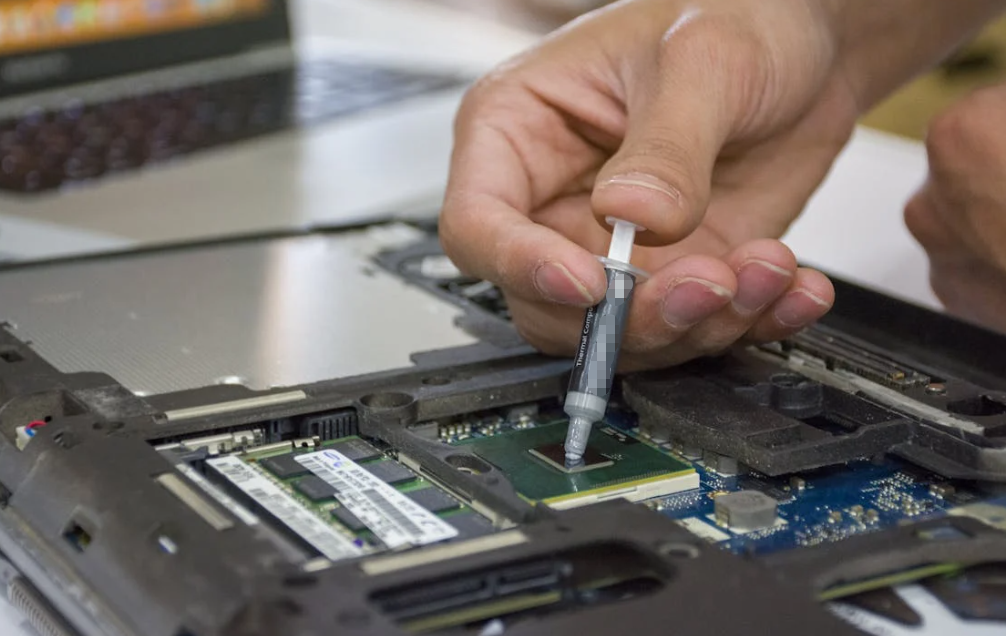
最新のプロセッサは高速で小型、しかも非常に高性能です。しかし、すべてのコンピューター内部には、その性能が安定して発揮され続けるか、熱による深刻な問題に転じるかをひそかに左右する小さな要素があります。それがサーマルグリースです。.
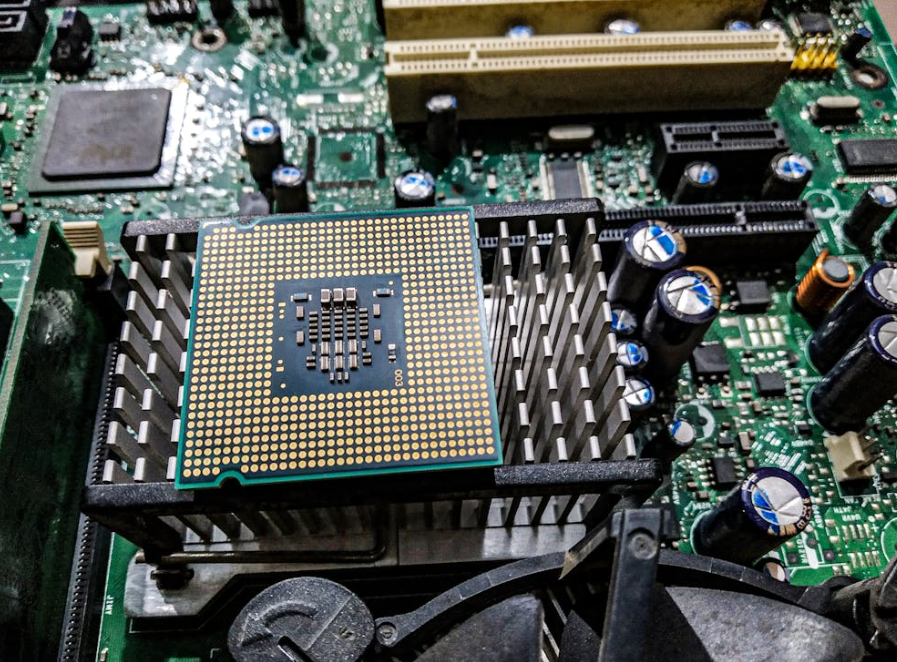
サーマルペースト、サーマルコンパウンド、またはTIM(熱インターフェース材料)とも呼ばれるサーマルグリースは、プロセッサとヒートシンクの間に配置されます。一見すると重要には見えません。小さな豆粒ほどの量が、数百ドル、場合によっては数千ドルもするハイエンドのCPUやGPUに影響を与えるとは、とても思えないでしょう。.
しかし、これがなければ、熱伝達効率は大幅に低下します。.
And when heat can’t move away from the chip fast enough, everything changes.
Performance slows down. Fans scream. Systems crash. In extreme situations, hardware lifespan can shorten dramatically.
So what actually happens if you skip thermal grease altogether?
The short answer: your device may still power on, but it will almost certainly run hotter, less efficiently, and less reliably.
This article breaks down the real-world consequences, the science behind thermal interfaces, and why manufacturers and thermal solution specialists like ハクタック continue developing advanced thermally conductive materials for modern electronics.
Why Thermal Grease Exists in the First Place
At first glance, a CPU and heatsink appear perfectly flat. In reality, both surfaces contain microscopic imperfections—tiny valleys, scratches, and air gaps invisible to the human eye.
That matters because air is a terrible conductor of heat.
熱伝導グリス fills those microscopic gaps and creates a more efficient path for heat transfer from the processor to the heatsink. Intel specifically notes that thermal interface material is essential because it compensates for natural surface imperfections between the processor and cooling solution.
Without thermal grease, those air pockets remain trapped between the metal surfaces.
結果は?
Heat stays inside the processor longer than it should.
A typical 熱伝導グリス may offer 熱伝導率 values above 5 W/m·K, while air sits around 0.024 W/m·K. That difference is enormous in thermal engineering terms.
What Happens Immediately Without Thermal Grease

Here’s the surprising part:
A computer can sometimes boot without thermal grease.
Many people assume the system simply refuses to start. That’s not always true. Modern CPUs include built-in thermal protection systems, so the machine may power on and even enter BIOS or Windows temporarily.
But once the processor begins handling real workloads, temperatures rise extremely fast.
Rapid Temperature Spikes
Without an efficient thermal interface, heat accumulates directly inside the CPU package.
Tasks like:
- ゲーム
- Video rendering
- CAD処理
- AI処理
- ストリーミング
- 大規模なスプレッドシート計算
数秒以内に温度を危険域近くまで上昇させる可能性があります.
Several technical sources report CPUs climbing past 90°C very quickly without proper thermal paste application.
この温度上昇は緩やかではありません。突然かつ不安定に上昇することがあります。.
お気づきかもしれませんが、
- ファンの突然の高速回転
- ランダムな遅延
- システムのフリーズ
- 予期せぬシャットダウン
- Temperature spikes during simple tasks
In laptops, the symptoms can become even worse because cooling space is already limited.
Thermal Throttling: The Silent Performance Killer
Before a processor destroys itself, it tries to save itself.
This is called thermal throttling.
Modern CPUs automatically reduce clock speeds and voltage when temperatures exceed safe limits. In simple terms, the processor intentionally slows down to produce less heat.
ユーザーには次のような症状として現れます:
- ゲームでのFPS低下
- マルチタスク処理の遅延
- アプリケーション起動の遅延
- 動画再生時のカクつき
- 描画速度の低下
実際の問題が熱伝達不良にあるにもかかわらず、ユーザーが誤ってGPU、RAM、またはソフトウェアの最適化を原因と考えることがあります。.
高性能プロセッサでも、適切なサーマルグリースを使用せずに動作させると、ブースト周波数を安全に維持できないため、はるかに安価なチップと同程度の性能しか発揮できないことがあります。.
この問題は、特に以下の環境で顕著になります。
- ゲーミングPC
- 産業用制御システム
- エッジコンピューティング機器
- 暗号通貨マイニングハードウェア
- AIサーバー
- 5G communication equipment
これらのシステムはいずれも、安定した熱管理に大きく依存しています。.
CPUは恒久的な損傷を受ける可能性がありますか?
This question appears constantly in PC forums and repair communities.
Technically, modern processors are much safer than older generations. Built-in protections usually shut the system down before catastrophic damage occurs.
However, “usually” is not the same as “always.”
Long-term overheating can still contribute to:
- Silicon degradation
- Reduced component lifespan
- Motherboard stress
- VRM overheating
- はんだ疲労
- システムの不安定さ
Repeated thermal cycling—heating and cooling over and over at excessive temperatures—places mechanical stress on electronic components.
In enterprise environments, this matters enormously.
A server that runs 15°C hotter than intended may not fail tomorrow. But over months or years, elevated temperatures can shorten operational life and increase failure rates.
That’s why data centers and industrial electronics manufacturers invest heavily in advanced thermal interface materials.
GPUs Suffer Too
Thermal grease isn’t only for CPUs.
Graphics cards depend on thermal interface materials just as much, sometimes more.
Modern GPUs can exceed 300W power consumption under load. Without effective heat transfer, temperatures rise quickly and throttle graphical performance.
Symptoms often include:
- FPS drops
- Black screens
- Driver crashes
- Artifacting
- Loud fan noise
- Reduced mining or rendering efficiency
In severe cases, overheating may damage memory modules or voltage regulation components surrounding the GPU die.
For AI acceleration and high-performance computing systems, thermal stability directly affects computational reliability.
The Myth: “Metal-to-Metal Contact Is Better”
Some beginners assume thermal grease is unnecessary because metal already conducts heat well.
The theory sounds logical.
The reality is different.
Even polished metal surfaces contain microscopic imperfections. When two “flat” surfaces meet, only portions actually touch. The remaining areas trap insulating air pockets.
Thermal grease does not replace metal conductivity.
It replaces trapped air.
That distinction is critical.
Why Some Systems Seem Fine Without Thermal Grease
You’ll occasionally see forum posts where someone claims their PC ran “okay” without thermal paste.
There are a few reasons this can happen temporarily:
Low Workload
If the CPU stays near idle, heat production remains limited.
Aggressive Thermal Protection
Modern processors can throttle heavily to avoid immediate damage.
Oversized Coolers
Large heatsinks may partially compensate for poor thermal transfer.
Short Testing Duration
A machine may survive a quick BIOS boot but fail during sustained workloads.
Community discussions on Reddit frequently show users surprised that their systems booted without paste, although experienced builders overwhelmingly warn against long-term operation that way.
The key takeaway:
“Working” does not mean “working properly.”
How Thermal Grease Improves Efficiency
Good thermal grease does more than prevent overheating.
It improves total system efficiency.
A well-designed thermal interface can help:
- Stabilize boost clocks
- Lower fan noise
- Improve energy efficiency
- Extend hardware lifespan
- Maintain stable operating temperatures
- 低減 熱抵抗
In industrial electronics, even small temperature reductions can significantly affect reliability.
There’s a commonly referenced engineering principle that many electronic component lifespans roughly double for every 10°C reduction in operating temperature. While actual results vary by design and environment, lower heat almost always improves long-term reliability.
That’s one reason thermally conductive material suppliers continue innovating in:
- シリコーンベースの TIMs
- Ceramic compounds
- Graphite sheets
- 相変化材料
- つなぎ言葉
- サーマルパッド
- Liquid metal solutions
Different Types of Thermal Grease

Not all thermal compounds are equal.
シリコーン系サーマルグリス
Widely used and affordable. Suitable for general consumer electronics.
セラミック系化合物
Electrically non-conductive and safer for beginners.
Metal-Based Thermal Grease
Higher thermal conductivity, often preferred by enthusiasts and overclockers.
液状金属
Extremely high conductivity but electrically conductive and more difficult to apply safely.
Some low-cost or poorly formulated compounds can create reliability issues over time. Recent investigations even uncovered chemically unstable thermal pastes capable of corroding copper surfaces and damaging cooling hardware.
That’s why material quality matters—not just thermal conductivity numbers on marketing sheets.
What Happens in Laptops Without Proper Thermal Grease
Laptops are even less forgiving than desktops.
Space is limited. Airflow is constrained. Cooling assemblies are thinner.
Without effective thermal grease:
- Fan noise increases dramatically
- Battery efficiency drops
- Surface temperatures rise
- CPU throttling becomes constant
- Gaming performance collapses
In ultrathin devices, a degraded thermal interface can make a premium laptop feel slow after only a few months of heavy use.
That’s why thermal maintenance has become increasingly important in gaming laptops and workstation notebooks.
Industrial Electronics Face Bigger Risks
In consumer PCs, overheating is annoying.
In industrial systems, overheating can become expensive.
Thermal interface materials are critical in:
- EV用バッテリーシステム
- パワーエレクトロニクス
- LED照明
- Telecom infrastructure
- Medical equipment
- 再生可能エネルギーシステム
- Robotics
- 車載電子機器
Thermal instability in these environments can lead to downtime, sensor failure, communication errors, or shortened product lifespan.
Manufacturers increasingly require high-performance thermally conductive materials capable of surviving:
- High vibration
- Wide temperature swings
- 湿度
- Long operational cycles
This is one reason companies like HakTak Thermal Materials focus on advanced thermal management technologies for demanding electronic applications.
Signs Your Thermal Grease May Be Failing
Even if thermal grease was originally applied correctly, it doesn’t last forever.
Over time, some compounds dry out, pump out, crack, or lose effectiveness.
Common warning signs include:
- CPU temperatures higher than normal
- Sudden thermal throttling
- Increased fan noise
- Random shutdowns
- Reduced gaming performance
- Overheating under light workloads
In desktops, thermal grease replacement every few years is common for heavily used systems.
For industrial equipment running continuously, maintenance schedules may be stricter.
How Much Thermal Grease Should Be Applied?
Interestingly, too much thermal grease can also cause problems.
The goal is a thin, even interface layer.
Excessive paste may:
- Spill onto nearby components
- Reduce mounting pressure efficiency
- Trap excess material
- Create messy installations
Too little paste leaves air gaps.
The industry-standard approach is usually:
- Small pea-sized drop
- 薄いスプレッド
- Even mounting pressure
The correct amount depends on chip size, heatsink design, and compound viscosity.
Thermal Pads vs. Thermal Grease
People often confuse thermal pads with thermal grease.
They serve related but different functions.
熱伝導グリス
最適:
- CPU
- GPU
- High-pressure contact surfaces
サーマルパッド
最適:
- VRAM
- MOSFET
- 凹凸のある表面
- Gap filling applications
Advanced systems frequently use both materials simultaneously.
HakTak and other thermal material manufacturers often provide complete thermal management solutions rather than relying on a single interface product.
Does Expensive Thermal Paste Matter?
For average office computers, almost any reputable thermal grease works adequately.
But for:
- オーバークロック
- AI computing
- Gaming rigs
- Workstations
- Industrial systems
- High-density electronics
higher-end thermal compounds can provide measurable improvements.
The difference may only be several degrees Celsius, but in thermal engineering, even small reductions can significantly improve stability and reliability.
That said, proper application matters just as much as premium material selection.
A badly applied high-end paste may perform worse than a properly applied standard compound.
The Future of Thermal Interface Materials
Electronics continue shrinking while power density rises.
That creates a major challenge:
More heat in less space.
As processors become faster and AI workloads intensify, thermal management is evolving rapidly.
Emerging solutions include:
- Nano-enhanced thermal compounds
- Graphene-based materials
- Phase-change TIMs
- Advanced silicone gap fillers
- Hybrid interface materials
The future of electronics performance increasingly depends not only on semiconductor design but also on efficient heat dissipation technologies.
Without effective thermal control, raw processing power becomes difficult to sustain safely.
結論
Skipping thermal grease may seem minor, but the consequences can be serious.
Without a proper thermal interface, processors struggle to transfer heat efficiently. That leads to higher temperatures, thermal throttling, louder cooling systems, reduced performance, and potentially shorter hardware lifespan.
Modern CPUs and GPUs include safety protections, so immediate catastrophic failure is less common than it once was. Still, operating without thermal grease is risky and never recommended for long-term use.
As computing power continues increasing across AI, automotive electronics, industrial systems, and consumer devices, high-quality thermally conductive materials have become more important than ever.
Reliable thermal management is no longer optional—it is part of modern electronic design itself.
よくある質問
Can a CPU run without thermal grease?
Yes, briefly. But temperatures can rise dangerously fast, especially under load.
Will missing thermal grease damage my processor?
It can contribute to overheating, instability, and reduced lifespan over time.
Is thermal grease the same as thermal paste?
Yes. The terms thermal grease, thermal paste, and thermal compound are often used interchangeably.
グリスはどのくらいの頻度で塗り替えるべきですか?
Typically every 2–5 years, depending on workload, temperature, and material quality.
Does expensive thermal grease improve performance?
In high-performance systems, premium thermal compounds can help lower temperatures and improve stability.